Demo Version Limitations
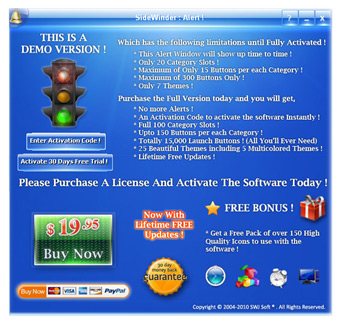
The Demo Version of the SideWinder has the following limitations until fully activated through online.
- An Alert window will show up time to time the SideWinder is used.
- There is a Maximum of 15 Buttons limit for each Category Slot.
- There are only 20 Category Slots available for you to use.
- You can have a Maximum of only 300 launch Buttons.
- You will only have 7 Themes.
Full Version Privileges
After your Purchase an Activation Code and a Resource Pack will be given to you immediately. Using the given code you can activate the SWiJ SideWinder online instantly. After your successful activation you'll have the following privileges than the Demo Version.
- No more Demo Version Alerts.
- You can have up to 150 launch Buttons per each Category Slot.
- There will be 100 Category Slots in 10 main pages.
- You can have a total of 15,000 launch Buttons at your finger tip. (That's all you'll ever need)
- You will have 25 Beautiful Themes including 5 Multicolored Themes.
- A Free Gift Pack of over 150 Crystal Icons will be given with your purchase. (This offer may change without any notice.)
- Get full Free Updates for Lifetime.
Purchasing a License
You will be offered one or more purchase methods through the SideWinder website or the built-in Alert window. You can choose any of the methods to get an Activation Code in order to activate the SideWinder to Full Version. To know more about the usage of the Activation Code please refer to the "License" chapter. To purchase a License immediately please follow the link below.
Activation Process
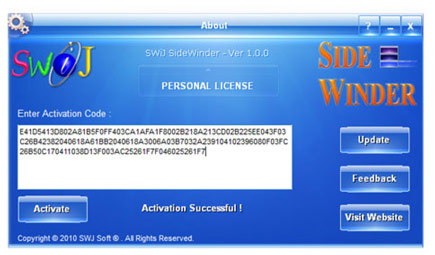
Please click on the About button in the Side Bar to open the About window. Here you can enter your Activation Code and click the Activate button to start the activation process.
You need to be online during the activation process and after that you may turn offline. If you have purchased a valid License for the SideWinder then you will be given an Activation Code which composed of a large string of characters and numbers and should be copied to the "Enter Activation Code" text box present inside the About window. After pasting the code carefully without any leading or trailing spaces into the text box, click the Activate button to start the activation process. Within a short while and if your activation is successful, a message will appear saying "Activation Successful !" and the "DEMO VERSION" tag will be turned to "PERSONAL LICENSE" or "HOME LICENSE" or "PRO LICENSE" according to the license type.
Activation Messages
When you're activating online you will get certain messages from the server. The descriptions of the messages are as below.
"Activation Successful !" - You have successfully activated the software.
"Activation Failed !" - You unable to activate the software due to several reasons such as the server may be busy, or your activation privileges have been already used or else your Activation code is invalid.
"Your Software is Fully Activated !" - You have a valid Activation Code and successfully activated the software.
"Your Software is Not Activated !" - You have not successfully activated the software yet.
"Your License Has Been Revoked Successfully !" - You have used an unauthorized license code.
"Connecting To Server …." - Server is being accessed or it is busy at the moment.
Free Trial Activation Process
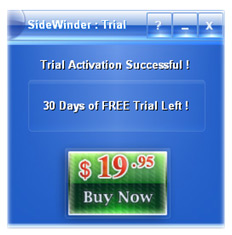
The SideWinder will automatically activate the 30 Days Free Trial on the First run on a computer. If you were not connected to the internet at that time then the SideWinder will function in the Demo Mode until you click the 'Activate 30 Days Free Trial' button inside the Demo Alert window. To view how many days left on the trial, Right Click on the About button in the Side Bar to open the Trial Info dialog box.
During the 30 days of Free Trial you have an unconditional use of the SWiJ SideWinder and may explore all the features without any hesitation or disturbance. After your Trial Period is over the SideWinder will automatically turn back to Demo Version and thereafter you have to purchase a Full Version to remove the Demo restrictions.
Contact Us
Click the Feedback button inside the About window to give us your feedback at any time, or you can use the web Contact Form in our website at
http://www.swij.com/sidewinder/contact.html or even email us your questions and feedbacks to support@swij.com. We will respond to you as soon as possible.
Website
For more information and other resources like Themes, Icons etc. visit our website by clicking the link below.