Categories
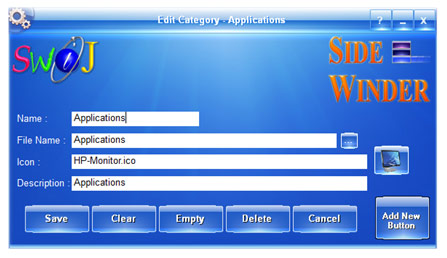
Right Click on a Category Slot to open its Category Editor window.
Category Name
Enter or change the Name of the Category Slot which will be displayed for you to identify the specific Category. You can even leave this field empty if the Category you're editing cannot be named.
Category File Name
You must specify or choose a Category File in order to add or use its Buttons on the Category Slot. Click the Select button at the end of the text box to choose an existing SideWinder Category file which has an extension ".swc" form the default Categories folder (Usually "…\My Documents\SideWinder\Categories").
Category Icon
Click the Icon button to select a suitable Icon for the Category or enter its file name with full path. You may choose not to have an Icon for any Categories.
Category Description
Enter a suitable description for the Category Slot, which will appear in the Tooltip if you bring the Mouse over that Slot. Leaving this empty will not display any Tooltip.
Save Category
Click the Save button to remember all of the changes you have made to the Category Slot. You may press the Cancel button if you do not want to save the changes.
Clear Category
Click the Clear button to empty all text entries on the Edit window. This will not affect the current Category File in any way. Until you click the Save button, no changes will be made to the Category Slot.
Empty Category
Click the Empty button to remove all launch Buttons from the current Category File and from the Slot. This will empty your Category File permanently and cannot be undone. We recommend you to backup your Category File before pressing the Empty button.
Delete Category
The Delete button will permanently delete the current Category File from your computer and will empty the text entries from the Slot. Please use this method only if you're sure that you don't need the Category File anymore.
Cancel Changes
To exit the Edit Category window without saving any changes please click the Cancel button. This won't apply if you have pressed the Empty or Delete button previously.
Add New Button
Click this button to open the Edit Button Properties window, where you can build a launch Button from scratch. You can only click this button if you already have saved the Category Slot. Please refer to the next chapter in order to find out more on adding a new launch Button.