Introduction
SWiJ SideWinder - Ver 2.4.1
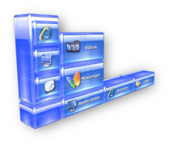
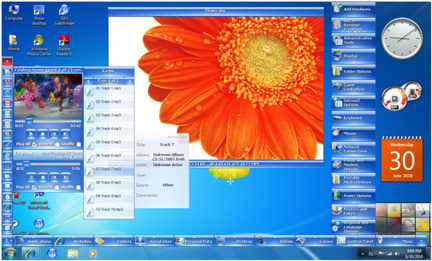
The SideWinder silently opens and stays at the left bottom corner of your PC screen and expands to a bar of 10 Category Slots when you bring the mouse over the Nip. When you hover the Mouse over the Categories a sub page of 15 quick launch Buttons opens to serve you immediately. When clicking on each Button, the relevant Application or Website launches rapidly than ever before. The semi-transparent, glassy Blue-Sapphire interface which comes as the default Theme enhances the look and feel of the Windows and urges to have fun with the software more and more.
You can have a total of 100 Categories in 10 pages and up to 150 Buttons per each Category in 10 sub pages with a maximum of 15,000 quick launch Buttons at once. That's all you'll ever need since you can add all your Applications, Documents, and Favorite Websites to this sophisticated launching tool and have a peace of mind by maintaining a clean and tidy Desktop and removing the Quick Launch Icons on your Task Bar.
The latest version of the SideWinder supports Mouse Wheel events which accelerates the navigation through the Category Pages and Sub Pages and allows you to launch all 15,000 Items in the SideWinder truly with a Single Click in a matter of a second. After the Folder Preview feature was introduced the SideWinder now has unlimited capacity to hold files in Albums and all can be accessed with just a Single Click.
Web Search Tool, Website Navigation & Instant Translator, Note Tool, Dictionary & Translator, Currency Converter, My PC Tool are some of the new features included in the SWiJ SideWinder.
Also the latest version accompanies with the Instant Preview feature of all major formats of Pictures, Audio and Video Files which you can Preview without any clicks at all. You can play all three Media formats in separate Players with separate Playlists at once, or Preview them one by one in a Mixed Media Library.
SideWinder is a lightweight and powerful tool which is capable of increasing your productivity a lot by saving huge amount of time spent on searching and clicking icons in normal way, and enhances the speed of Windows by eliminating the necessity to have any icons on your Desktop and removing the Quick Launch Toolbar from Windows. Whether you're an Office Worker, a Student, or a Home User or even a Full-time Gamer, the SideWinder will take you to the next level of Windows Experience. "If you use Windows, you must have SideWinder".
SWiJ SideWinder is an exceptionally powerful multipurpose Windows utility program which allows you to easily launch Applications, Websites, Shortcuts, Folders, Document Files, Pictures, Music and Videos with just a click. It can even be used to store your frequently used Texts such as Email addresses and personal information inside launch Buttons and then paste them to your Web browser or Text Editor with a single click.
It also comes with a Quick Access Side Bar which has all the important Windows functions like Show Desktop, Shutdown & Restart, Task Manager, etc.
Main Features
• Launch Applications
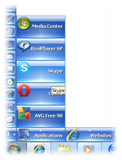
Quickly launch executable Applications, Games and Shortcuts with just a click. Easily drag & drop the Icons of your favourite programs over a suitable Category and SideWinder will automatically store the program as a launch Button. Open the relevant Application faster than any other method available in Windows by clicking its Button.
• Launch Websites
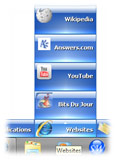
Open your favorite Websites and frequently used Internet Shrotcuts using your default Web Browser by SideWinder's special in-built URL feature. You can either drag & drop Internet Shortcuts to the Categories or manually enter hyperlinks inside the Buttons. You can also add special icons to distinguish the Websites as shown in the samples.
• Open Files and Documents
Place your often used Files and Documents as Buttons in SideWinder and launch them at your convenience. You can also put your music files according to their Albums, Genre, etc. in separate Categories and launch them as you like with just a click. All you have to do is just drag & drop the Media Files or the Folders that contain them, on a suitable SideWinder Category and everything will be stored as launch Buttons.
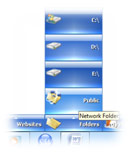
• Open Local and Network Folders
You can add any Folders in your local machine or from any other Network location which is linked to your PC, as quick launch Buttons in SideWinder. Drag & drop them as you would with Files and they will be there for you to instantly launch them without searching the locations through Windows Explorer again and again. You can also add Drives and Removable Devices such as USB pen Drives to the SideWinder and whenever they are plugged-in to your computer they can be accessed through the launch Buttons instantly.
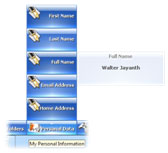
• Paste Text Snippets While Typing
Store all your frequently used Texts such as your Email Addresses, Full Name, Home Address, Contact Numbers, etc. inside SideWinder, and you can paste them to your Web Browser or Text Editor instantly whenever you need. Use the special Text feature inside the Buttons to save Texts and you will find the importance of this feature when Browsing the Internet or Editing Documents. You can also Preview the Text Snippets Instantly.
• Launch Windows Tools
The built-in Quick Access Side Bar helps you to launch important Windows tools such as Calculator, Paint, Notepad, Media Player, Email-Client , Control Panel, Internet Explorer and My Computer immediately with a click. All these are at the tip of your finger and you do not have to worry about clicking the Start Menu again.
• Perform System Functions
SideWinder allows you to perform some important system functions such as Show Desktop, Shutdown & Restart, Switch User & Log Off, Sleep & Hibernate. Also you can open the Task Manager with a Right Click on the 'Show Desktop' Button.
Benefits of the Program
- Launch any Applications or Games regardless of whether you're at the Desktop or Running a Program.
- Get one click access to your favorite Websites and Internet URLs as never before.
- Open Important Files and Documents with simple clicks.
- Group and arrange your favorite music files according to their Albums, Genre, Author, etc. and play them at your will.
- View the Tag information of your MP3 and WMA music files while playing them.
- Put your entire video collection and even links to your favorite videos from sites like YouTube at one location and play them whenever you like.
- Select and organize your Pictures according to their Albums and keep them neatly in a single Category or multiple Categories and show them to your Friends one by one.
- Get Instant Preview of all Media files you put inside the SideWinder even without a single click.
- Open Folders from your computer or other Network Locations instantly by placing them in SideWinder.
- Get immediate access to Internal & External Hard Drives, USB Pen Drives, Camera Folders and other Removable Media whenever they're available on your PC.
- Fill your entire Web Forms easily by storing your personal information like Email Addresses, Full Name, Contact Numbers, etc. into SideWinder Buttons and paste them at any time you need even while you type.
- Search the Web instantly with famous sites such as Google, Yahoo, Bing, YouTube, eBay, etc.
- Navigate to a website instantly from anywhere by entering its URL inside the Address Bar.
- Translate Web Pages and entire Websites to and from 53 languages instantly.
- Place and edit your notes instantly inside the SideWinder's Note Tool.
- Get the meaning of a word or translate a word into 17 languages instantly with the built-in Dictionary and Translator.
- Place To-Do Lists or Important Notices on SideWinder, so you won't miss place or forget them again.
- Get up-to date Currency Rates and convert International Currencies with a single click.
- Quickly Turn Off your Monitor Screen using the Mouse without jamming the Monitor's Physical Button.
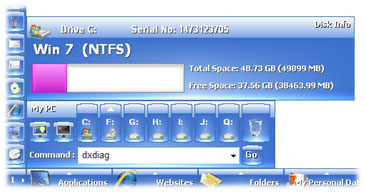
- Quickly Open Physical & Logical Drives, View Free Space and other information of available Drives and Open their Properties Window.
- Open & Close the Doors of CD/DVD Drives with your Mouse.
- Easily Remove or Eject USB Drives with one click.
- Open or Empty the Recycle Bin easily and without the need to goto to the Desktop.
- Goto to the DOS Command Prompt with a single click.
- Open and Execute system applications and commands using the Built-in Run Command Tool with useful pre-loaded commands.
- If you're a Student then save your Terminologies and their Definitions in SideWinder so you can always keep in touch with them.
- Use the built-in Scientific String Calculator to perform long and tedious calculations very easily.
- Automate windows Shutdown and Restart processes with the built-in Shutdown Timer.
- Time the launch of external Applications with the Shutdown Timer Utility.
- Rapidly switch between opened windows and Web Browser Tabs using the Switch Window Utility.
- Minimize or Maximize all opened windows and Close, Maximize/Restore or Minimize individual windows using the Switch Window Utility.
- Open useful Windows tools like Calculator, Paint, and Notepad, etc. form the SideWinder's Quick Access Side Bar and save your valuable time.
- Perform system functions like Shutdown, Restart, Switch User, Log Off, Sleep and Hibernate form the Side Bar.
- Remove your Windows Quick Launch Icons from the Task Bar and use the Side Bar to open My Computer, Windows Media Player and Internet Explorer and even Show the Desktop form it.
- Also open the Task Manager, Network Places, Windows Explorer, Sound Recorder, System Properties, Windows Messenger, Character Map and WordPad by Right Clicking on the Side Bar Buttons.
- Maintain a clean and tidy Desktop to increase Windows performance by placing all your Icons on SideWinder.
- Have a total of 15,000 quick launch Buttons without affecting the System's performance.
- Enhance the quality of your Windows Experience with the smooth and glide SideWinder Buttons.
- Give your Windows a beautiful glassy toolbar which brings fun when using. As we say "Play SideWinder When You're Bored."
- Choose Themes from a variety of Professional Themes Gallery to match your current Windows Theme and Desktop Background.
- Share SideWinder Links and Texts with your colleagues and family members by just copying the relevant Category files to their Computers.
Version Changes
Ver 2.4.1
- Added Settings option to change the SideWinder Shortcut Keys.
- Fixed problem with detecting USB Hard Drives as Ejectable Media.
- Button Height increased for higher resolutions of the Monitor.
- Two new licensing options added (Dual License & Group License).
- Some minor Enhancements were made.
Ver 2.4.0
- Instant auto 30 Days hassle free Trial Activation.
- Settings option to Adjust the Shrinking and Hiding Speed of the SideWinder.
- Settings options to Turn On/Off the Tools and Utilities individually.
- Press 'Ctrl + Alt' keys together and Left Click on a Launch Button to Delete it immediately.
- All SideWinder User Settings were transferred to the Windows Registry to increase speed.
- Executable file size reduced and the SideWinder loads faster and smoother then before.
- Several Video Tutorials available at the official Website to help beginners use SideWinder.
- Some other Enhancements and Bug fixes were made.
Ver 2.3.0
- Fill entire Web Forms at once using SideWinder's Text-Snippet feature: When adding a Text-Snippet to a Launch Button, type '|' to create a line break / perform Enter operation, type '>>>' to perform a forward TAB and type '<<<' to perform a backward TAB on the target window.
- In the Switch Window Utility if a Window has several Tabs like a Web Browser, you can cycle between the Internal Tabs by clicking the MouseWheel button once on that particular Icon and rotating the Wheel Up or Down.
- Drag & Drop a link from a web page onto a Category Slot in order add it easily as a Launch Button, and if you wait a little while after dropping, the SideWinder will automatically grab the relevant Favicon of that Website for you.
- Drag & Drop Text-Snippets to a Category Slot to add as Launch Buttons easily.
- Press 'Left Windows Key' + 'Space' or 'Left Windows Key' + 'X' to expand the SideWinder Bar and go forward in Page numbers.
- Press 'Right Windows Key' + 'Space' or 'Right Windows Key' + 'Z' to expand the SideWinder Bar and go backward in Page numbers.
- Turn on the 'Scroll Lock' in order to avoid the SideWinder Bar from shrinking when you're adding Buttons.
- NoteTool size increased and instant Word and Character count features added.
- Launch Buttons' size increased to accommodate entire Name nicely in lines without overlapping the Button Icons.
- Arrow indicator added to show whether a launch Button has instant Preview or not.
- Memory usage further reduced.
- Some other minor Enhancements and Bug fixes were made.
Ver 2.2.0
- Free 30 Days Fully Functional Trial Mode Introduced.
- Feature added to Paste the Text-Snippets directly to your Web browser, Text Editor, etc.
- Ctrl+ Left Mouse Click will copy the Reference Text of the Launch Buttons to Clipboard .
- Edge Button added in addition to the Nip Button to facilitate easy flipping through Category Pages.
- Settings option added to select the Total Number of active Category Slots.
- Usage of pipes "|" to create line breaks in Button Names introduced.
- Side Bar Tools now load much faster and smoother than ever before.
- Certain Bugs which caused the SideWinder to crash are now fixed.
- The SideWinder Setup Package is now distributed with Microsoft Authenticode Signature to avoid unnecessary warnings to the User. Please verify that the installation package you have is signed by 'SWJ Soft'.
Ver 2.1.1
- User desired Fonts can be selected for the SideWinder Buttons. (Non-English users will benefit)
- Close and Restore features added to Switch Window Utility.
- SideWinder now automatically adjusts to the location of the TaskBar without crashing.
- Memory usage optimized and reduced.
- Button caching is performed faster and silently than before.
Ver 2.1.0
- Switch Window Utility added to the "Show Desktop" Side Bar Button.
- Scientific String Calculator added to the "Calculator" Side Bar Button.
- Shutdown Timer added to the "Shutdown" Side Bar Button.
- Quick Preview feature of the Text Snippets added to the Launch Buttons.
- Tip of the Day feature added.
- Operation Mode of the SideWinder can be set as Basic or Advanced Mode.
- Fixed crashing of SideWInder when playing Audio and Video Files using the built-in Players.
- SideWinder now loads Faster and Smoother than ever before.
- Enhanced performance with Memory and CPU usage.
- Few other Enhancements and Bugs Fixes.
Ver 2.0.0
- Mouse Wheel and Keyboard support added for extremely fast and silent navigations throughout the SideWinder.
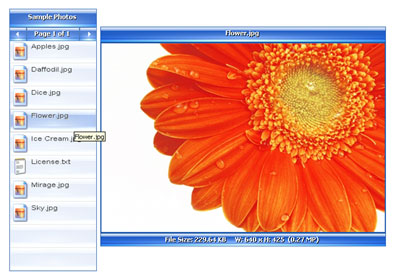
- Instant Picture Preview and Full Screen Image Viewer features added.
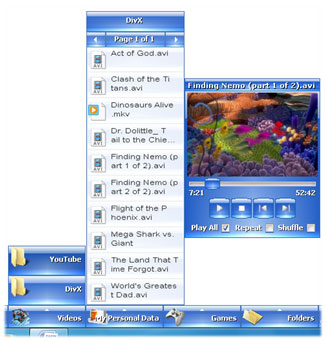
- Instant Video Preview and Full Screen Video Player features added.
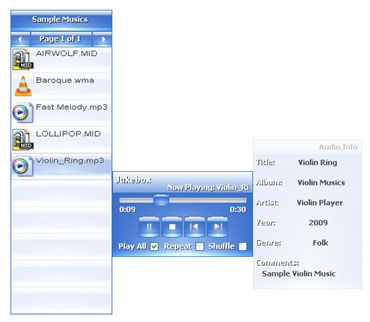
- Instant Audio Preview and Jukebox features added.
- Instant display of the Tag Information of Music Files (MP3 & WMA).
- My PC Tool added to the "My Computer" Side Bar Button. (Quickly Turn Off Monitor, Open Command Prompt, Quickly Open Physical & Logical Drives, View Free Space and other info of available Drives and Open Properties Window, Open & Close Doors of CD/DVD Drives, Remove/Eject USB Drives with one click, Open/Empty Recycle Bin, Built-in Run Command Tool with pre-loaded commands.)
- Instant Website Translation feature added to the Web Search Tool.
- Instant and upto date Currency Converter Tool added to the "Calculator" Side Bar Button.
- Display the "Open With" dialog box when Right Click the Items in the Folder Preview Tool.
- Added "Windows Explorer" to the Right Click event of "Internet Explorer".
- Added "Sound Recorder" to the Right Click event of "Media Player".
- Added "Windows Messenger" to the Right Click event of "Write Email".
- Added "Character Map" to the Right Click event of "Calculator".
- Ability to add Folders relative to the application's location.
- Fixed error with the built-in Dictionary and Translator.
- Enhanced speed of loading.
- Few other Enhancements and Bugs Fixes.
Ver 1.2.0
- Note Tool added to the "NotePad" Side Bar Button.
- Dictionary & Translator Tool added to the "NotePad" Side Bar Button.
- SideWinder now comes with Lifetime Free Updates.
Ver 1.1.0
- Instant Preview of Folder Files Added to the Launch Buttons.
- Added Address Bar to the Web Search Tool.
- Volume Control Added to the "Media Player" Side Bar Button.
- Added "WordPad" to the Right Click event of "NotePad".
- Changed Navigation Directions of the Category Pages.
- Optimized Button Caching System.
- Product Licensing has changed to Personal, Home and Pro Licenses.
- Default Shortcut key assigned as {Ctrl + Shift + W} to open SideWinder.
- Fixed some Minor Bugs.
Ver 1.0.3
- Added Instant Web Search Tool to the Quick Access Side Bar.
- Added "Network Places" to the Right Click event of "My Computer".
- Improved Button Caching System.
Ver 1.0.2
- Ability to delete/move the Shortcuts after adding them to SideWinder.
- Added “System Properties” to the Right Click event of “Control Panel”.
- Fixed Bugs which delayed Button executions.
Ver 1.0.1
- Increased Speed of Loading Categories.
- Optimized caching Items.
- Fixed Bugs.
Ver 1.0.0
System Requirements
SWiJ SideWinder is designed for PCs running on all Windows operating systems including Windows 7 64-bit and it will work almost on all PCs without any significant differences. But the following are the recommended system specifications.
- Operating System : Windows XP or Latest
- Free Memory : 30 MB or more for Basic Mode & 100 MB or more for Advanced Mode.
- Hard disk : 20 MB or More
- Processor : Pentium III 1.2 GHz or Faster
- Screen Resolution : 800 x 600 or Higher
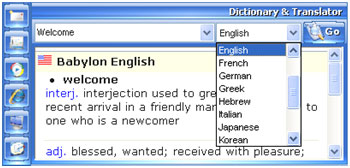
• Built-in Online Dictionary and Translator
The SideWinder also comes with an integrated online Dictionary and Translator Tool which you can use to instantly get the meanings and translations of a word or a phrase in 17 languages with just a click. The tool is powered by the famous Babylon dictionary and translator which is used by millions around the globe.
• Search the Web Instantly
With SideWinder's integrated Web Search Tool you can instantly search the web using world's best search engines such as Google, Yahoo, Bing, etc. You can also search Wikipedia, YouTube, Facebook, etc. using the same tool with just a click. Also navigate to a web page instantly by using the Address Bar and get instant translations of web pages and websites upto 53 languages with a tap of your Mouse.
• My PC Tool
With SideWinder's new My PC Tool you can Quickly Turn Off your Monitor Screen, Open DOS Command Prompt, Quickly Open Physical & Logical Drives, View Free Space and other information of available Drives and Open their Properties Window, Open & Close Doors of CD/DVD Drives, Remove/Eject USB Drives with one click, Open/Empty Recycle Bin, Open and Execute system applications and commands using the Built-in Run Command Tool with pre-loaded commands.
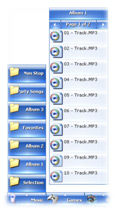
• Instant Audio Preview and Jukebox
Preview your Music as you hover the Mouse over the Audio files you put inside the SideWinder as Folders and Play your Audio Albums with the built-in Jukebox which can also display the Tag Information of your MP3 and WMA files as they play.
• Instant Picture Preview and Full Screen Image Viewer
View instant Preview of your Photos from your Albums you put in the SideWinder as Folders, even without a single click. You can view all major image formats like JPG, GIF, PNG, BMP, etc. and also Preview them one by one in Full Screen very easily.
• Instant Video Preview and Full Screen Video Player
Another fascinating feature of the SideWinder is its ability to show instant Preview of Video files and Play them in Full Screen like a professional Video Player. You can maintain your Video Albums inside the SideWinder and Play all major Video Formats like AVI, WMV, MP4, FLV, etc. without the need of opening any other Media Players.
• Built-in Scientific String Calculator (SSC)
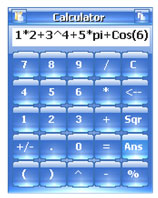
With SideWinder's new built-in Scientific String Calculator you can do extra long calculations with extra ease. Almost similar to a professional scientific calculator the SSC offers evaluation of long length of additions and multiplications along with a list of scientific functions which you'll never get with any standard desktop calculators.
• Built-in ShutDown Timer
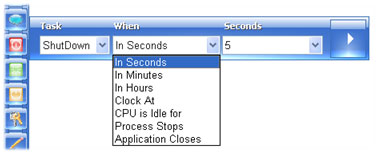
With SideWinder's Shutdown Timer you can automate the system processes like Shutdown, Restart, Hibernate, Lock, etc. as for your specific needs. You can also time the launch of external Applications with this sophisticated tool.
• Rapid Windows Switching Utility
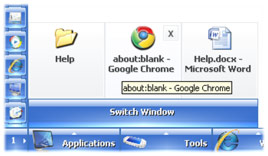
The Switch Window utility provides a useful and the fastest possible way to switch between running windows on your PC even without a single click. Also quickly perform Close, Minimize, Maximize and Restore functions on opened windows easily. You can also cycle through your Web Browsers' Tabs easily with this tool.